




- OVERVIEW
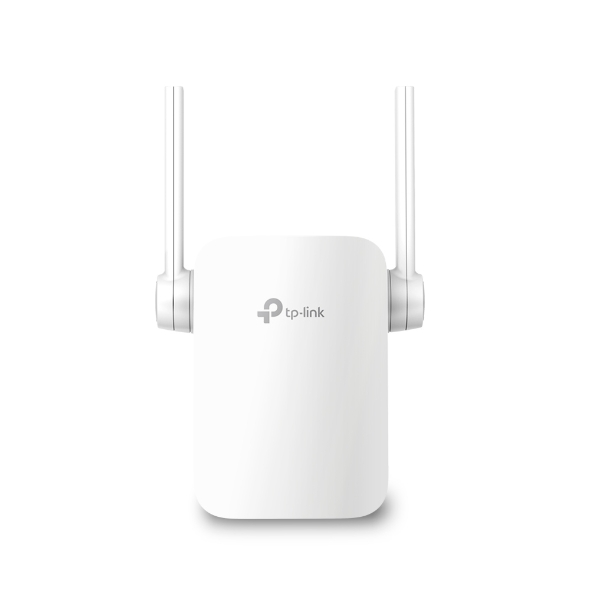
Stable Dual-Band Wi-Fi Extension to Bring Dead Zones to Life: AC750 Wi-Fi Range Extender RE205
Easily Expand Your Wi-Fi Coverage: Tired of Wi-Fi dead zones in your home? The RE205 Range Extender connects to your Wi-Fi router wirelessly, strengthening and expanding its signal into areas it can’t reach on its own, while reducing signal interference to ensure reliable Wi-Fi coverage throughout your home or office.
High-Speed Dual Band Wi-Fi for Better Connections :The RE205 lets you keep more devices* connected at the same time with its 2.4GHz 300Mbps and 5GHz 433Mbps dual bands. Use the 2.4GHz band to send email and browse the web, and the 5GHz band for gaming and HD streaming.
Perfect Location at a Glimpse : An Intelligent Signal light helps you quickly find the best location to install the RE205.
Built-in Access Point Mode :RE205 is more than a wireless range extender. Simply plug an Ethernet cable into its Ethernet port to easily turn your wired internet connection into a dual-band wireless access point.
Flexibly Create Whole Home Mesh WiFi : If you have any dead zones at home, just add another EasyMesh-compatible router to further form your whole home mesh WiFi. No more searching for a stable connection.
Easy Management and Remote Control : The RE205 works with all Wi-Fi routers. You can use TP-Link’s Tether app to set up the range extender from any Android or iOS device in minutes. This feature-rich app allows you to enjoy not only hassle-free installation but also access to advanced network management, all at your fingertips.
- SPECIFICATIONS :
HARDWARE FEATURES
Standards and Protocols: IEEE802.11ac, IEEE 802.11n, IEEE 802.11g, IEEE 802.11a, IEEE 802.11b
Plug Type: EU
Interface: 1 x 10/100Mbps Ethernet Port (RJ45)
Button: WPS Button, Reset Button
Input Power: 100-240V~50/60Hz
Max. Power Consumption: 7.3W(max power consumption)
Dimensions ( W x D x H ): 3.06 x 1.57 x 3.15 in. (77.8 x 40 x 80 mm)
Antenna: 2 x external
WIRELESS FEATURES
Wireless Standards: IEEE 802.11a/n/ac 5GHz, IEEE 802.11b/g/n 2.4GHz
Frequency: 2.4GHz & 5GHz(11ac)
Signal Rate: 300Mbps at 2.4GHz, 433Mbps at 5GHz
Working Modes: Range Extender/Access Point
Reception Sensitivity
-5GHz:
11a 6Mbps:-94dBm@10% PER
11a 54Mbps:-77dBm@10% PER
11ac HT20:-69dBm@10% PER
11ac HT40:-66dBm@10% PER
11ac HT80:-63dBm@10% PER
-2.4GHz:
11g 54Mbps:-79dBm@10% PER
11n HT20:-77dBm@10% PER
11n HT40:-74dBm@10% PER
Wireless Functions:
Enable/Disable Wireless Radio
DFS (the latest firmware and hardware version is required)
Access Control
LED Control
Power Schedule
Wi-Fi Coverage
Wireless Security: WEP, WPA/WPA2-PSK encryptions, Enable/Disable SSID Broadcast
Transmission Power: 2.4 G≤20dBm, 5 G≤20dBm
OTHERS
Certification: CE, RoHS
Package Content:
AC750 Wi-Fi Range Extender RE205
Quick Installation Guide
System Requirements: Microsoft Windows 98SE, NT, 2000, XP, Vista™ or Windows 7, 8, 8.1, 10, MAC OS, NetWare, UNIX or Linux Internet Explorer 11, Firefox 12.0, Chrome 20.0, Safari 4.0, or other Java-enabled browser
Environment:
Operating Temperature: 0°C~40°C (32°F~104°F)
Storage Temperature: -40°C~70°C (-40°F~158°F)
Operating Humidity: 10%~90% non-condensing
Storage Humidity: 5%~90% non-condensing